PA2:指令系统
实验目的:
- 掌握i386(IA-32)指令格式。
- 掌握NEMU平台的指令周期。
运行用户程序
任务:编写几条指令的helper函数, 使得第一个简单的C程序可以在NEMU中运行起来。
流程:
make run运行NEMU。- 按
c执行程序。 - 查看报错信息,观察出现未知指令的内存地址和对应操作码。
- 编写对应的指令文件
xxx-template.h,xxx.h,xxx.c。 - 在
all-instr.h中添加对应的头文件。 - 在
exec.c中对应位置添加操作名称。
添加call指令
查找call指令对应的Opcode等信息,可知操作码为e8。
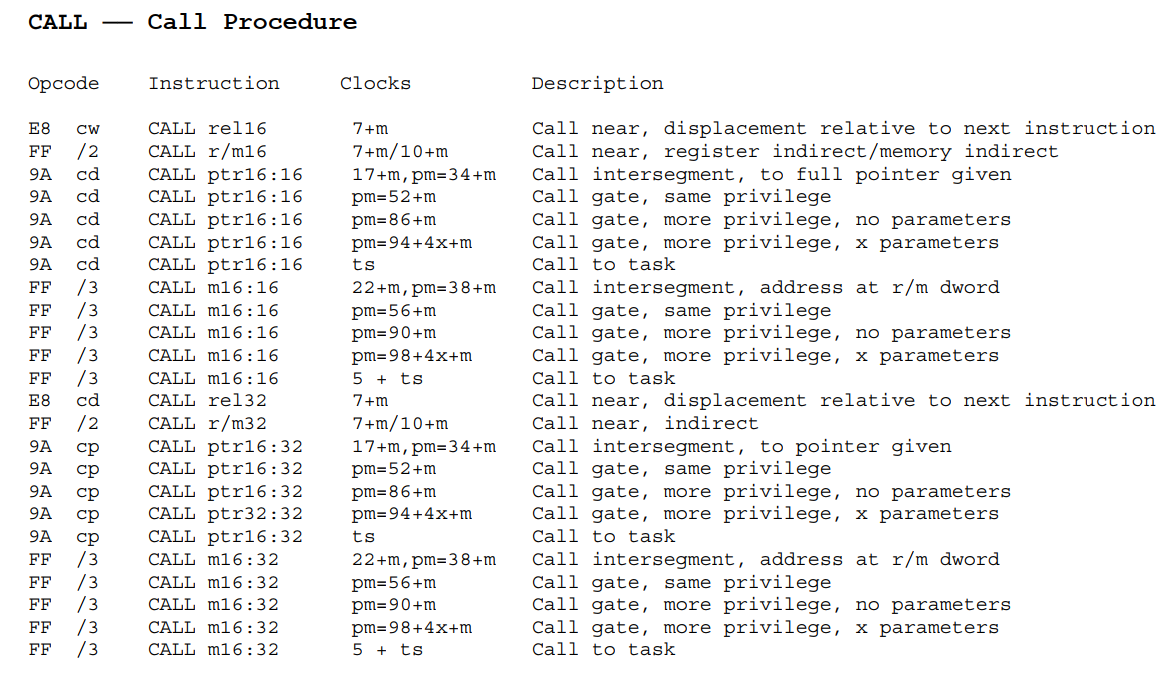
call指令
- 编写
call-template.h
 1#include "cpu/exec/template-start.h"
 2
 3#define instr call
 4
 5// call + 相对偏移量(视为一个立即数)
 6make_helper(concat(call_i_, SUFFIX)) {
 7    // 解码偏移量(立即数)
 8    int len = concat(decode_i_, SUFFIX)(cpu.eip + 1);
 9    // 压栈操作 (push)
10    reg_l(R_ESP) -= DATA_BYTE;
11    // eip寄存器的下一位地址写入esp (mov)
12    MEM_W(reg_l(R_ESP), cpu.eip + len + 1);
13    // 加上立即数偏移量,实现跳转
14    cpu.eip += (DATA_TYPE_S)op_src->val;
15    // 更新eip寄存器
16    print_asm("call: 0x%x", cpu.eip + len + 1);
17    return len + 1;
18}
19
20// call + 寄存器
21make_helper(concat(call_rm_, SUFFIX)) {
22    // 解码寄存器/内存
23    int len = concat(decode_rm_, SUFFIX)(eip + 1);
24    reg_l(R_ESP) -= DATA_BYTE;
25    MEM_W(reg_l(R_ESP), cpu.eip + len + 1);
26    cpu.eip = (DATA_TYPE_S)op_src->val - len - 1;
27    print_asm("call: %s", op_src->str);
28    return len + 1;
29}
30
31#include "cpu/exec/template-end.h"
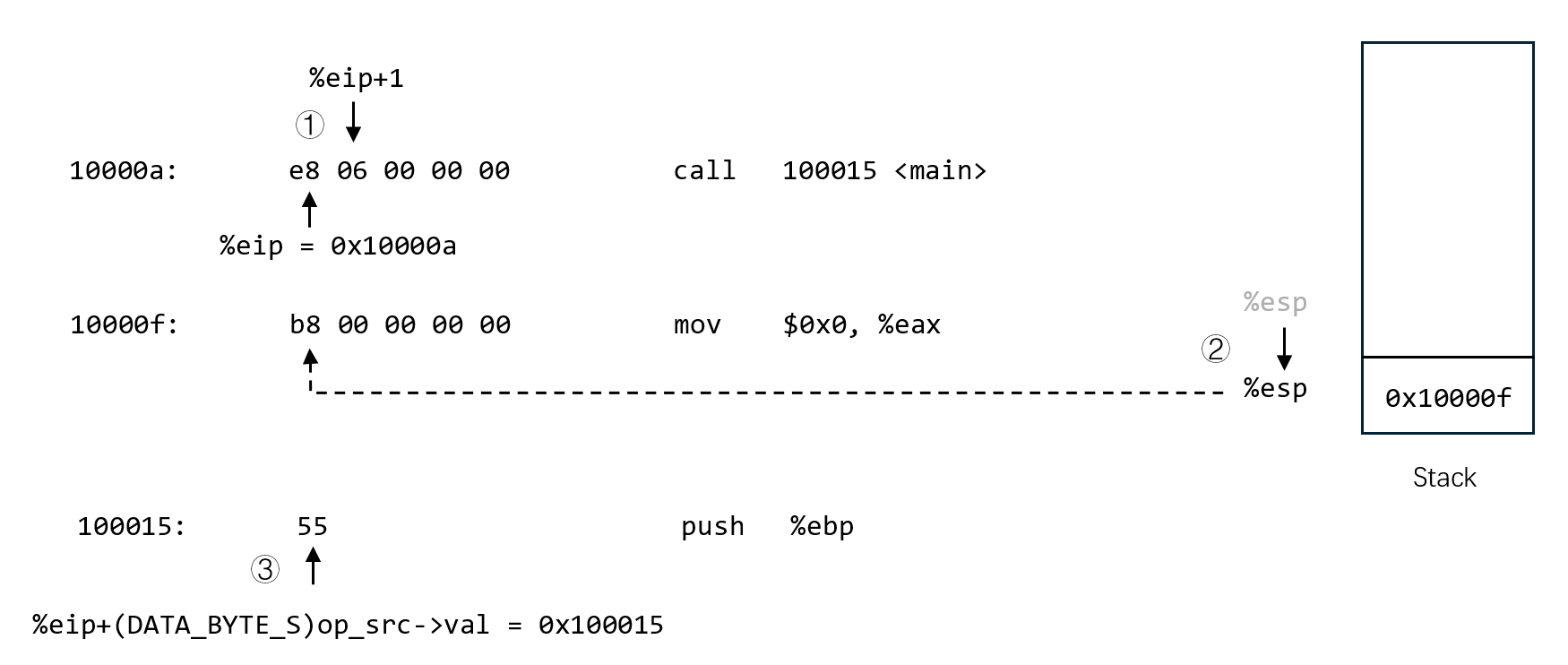
call指令示意
- 编写
call.c
 1#include "cpu/exec/helper.h"
 2
 3#define DATA_BYTE 1
 4#include "call-template.h"
 5#undef DATA_BYTE
 6
 7#define DATA_BYTE 2
 8#include "call-template.h"
 9#undef DATA_BYTE
10
11#define DATA_BYTE 4
12#include "call-template.h"
13#undef DATA_BYTE
14
15make_helper_v(call_i)
16make_helper_v(call_rm)
- 编写
call.h
1#ifndef __CALL_H__
2#define __CALL_H__
3
4make_helper(call_i_v);
5make_helper(call_rm_v);
6
7#endif
- 在
nemu/src/cpu/exec/all-instr.h中包含call.h,并在nemu/src/cpu/exec/exec.c中的opcode_table中填写相应的helper函数。
添加test指令
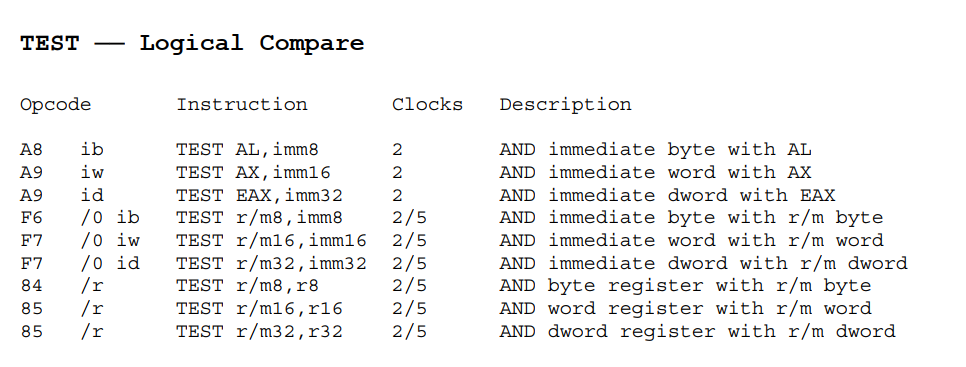
test指令
test指令其实相当于进行AND按位与操作,但是test是不会改变操作数的,只会改变EFLAGS寄存器中的标志位。
| 标志位 | 名称 | 功能 |
|---|---|---|
| CF | 进位标志 | 如果运算的结果最高位产生了进位或借位,其值为1,否则为0。 |
| PF | 奇偶标志 | 计算运算结果里1的奇偶性,偶数为1,否则为0。 |
| ZF | 零标志 | 相关指令结束后判断是否为0,结果为0,其值为1,否则为0。 |
| SF | 符号标志 | 相关指令结束后判断正负,结果为负,其值为1,否则为0。 |
| I | 中断使能标志 | 表示能否响应外部中断,若能响应外部中断,其值为1,否则为0。 |
| DF | 方向标志 | 当DF为1,ESI、EDI自动递减,否则自动递增。 |
| OF | 溢出标志 | 反映有符号数运算结果是否溢出,如果溢出,其值为1,否则为0。 |
- 编写
test-template.h
 1#include "cpu/exec/template-start.h"
 2
 3#define instr test
 4
 5static void do_execute() {
 6    // 两个操作数进行与运算
 7    DATA_TYPE result = op_dest->val & op_src->val;
 8
 9    cpu.eflags.CF = 0;
10    cpu.eflags.OF = 0;
11
12    // 在/nemu/src/cpu/eflags.c中定义的函数
13    // 可根据结果自动修改eflags寄存器的值
14    update_eflags_pf_zf_sf((DATA_TYPE_S)result);
15    print_asm_template1();
16}
17make_instr_helper(i2a)
18make_instr_helper(i2rm)
19make_instr_helper(r2rm)
20
21#include "cpu/exec/template-end.h"
程序中经常使用一些缩写,并已成为约定俗成的惯例。
例如,为了方便理解,通常把
to用2代替。因此i2rm表示立即数传到寄存器/内存中,r2rm表示寄存器传到寄存器/内存中。
i18n与此类似,是internationalization的缩写,表示“国际化”。
- 编写
test.c
 1#include "cpu/exec/helper.h"
 2
 3#define DATA_BYTE 1
 4#include "test-template.h"
 5#undef DATA_BYTE
 6
 7#define DATA_BYTE 2
 8#include "test-template.h"
 9#undef DATA_BYTE
10
11#define DATA_BYTE 4
12#include "test-template.h"
13#undef DATA_BYTE
14
15make_helper_v(test_i2a)
16make_helper_v(test_i2rm)
17make_helper_v(test_r2rm)
- 编写
test.h
 1#ifndef _TEST_H_
 2#define _TEST_H_
 3
 4make_helper(test_i2a_b);
 5make_helper(test_i2rm_b);
 6make_helper(test_r2rm_b);
 7
 8make_helper(test_i2a_v);
 9make_helper(test_i2rm_v);
10make_helper(test_r2rm_v);
11
12#endif
添加je指令

je指令
添加je指令有两种方法,一种是参考普通指令的执行方式,用
static void do_execute创建函数并使用make_instr_helper();另一种是直接定义一个新的make_jcc_helper()宏。这里采用后者,因为这样所有条件跳转如jne,jg,jge等都可以用make_jcc_helper()的宏实现。
 1#include "cpu/exec/template-start.h"
 2
 3// 条件跳转指令译码过程复杂,make_instr_helper无法使用,需要重新定义
 4#define make_jcc_helper(cc) \
 5    make_helper(concat4(j, cc, _, SUFFIX)) { \
 6        int len = concat(decode_si_, SUFFIX)(eip + 1); \
 7        print_asm(str(concat(j,cc)) " %x",cpu.eip+op_src->val+1+len+(DATA_BYTE == 4)); \
 8        if (concat(check_cc_, cc)()) { \
 9            cpu.eip += op_src->val; \
10        } \
11        return len + 1; \
12    }
13
14#include "cpu/exec/template-end.h"
在include/cpu/eflags.h中定义比较函数:
1static inline bool check_cc_e() {
2    return cpu.eflags.ZF == 1;
3}
这样在调用make_je_helper时就会使用check_cc_e函数判断是否更新eflags寄存器的值。
添加其他指令
- push指令
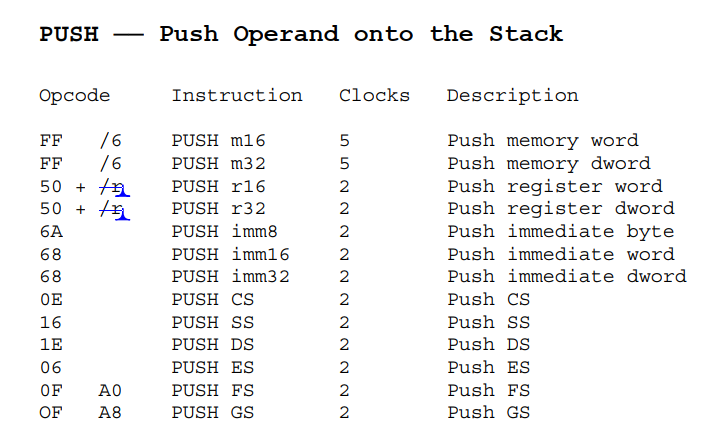
push指令
操作流程:
① esp寄存器值减4,表示栈顶指针下移一个地址的长度。
② 将读入的数据写入地址中,表示数据入栈。
- cmp指令
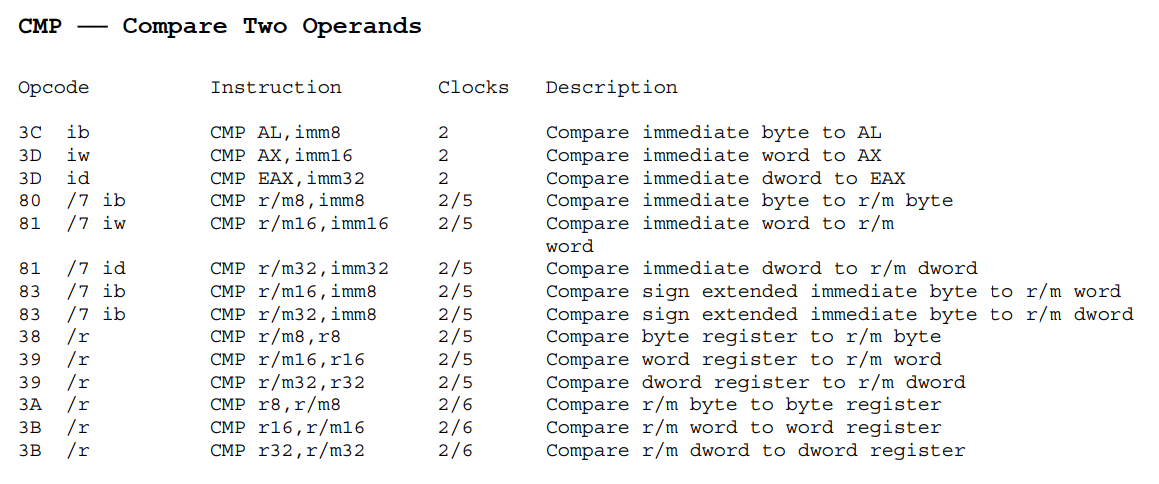
cmp指令
操作流程:
① 记录源操作数-目标操作数的值。
② 用所得的值更新eflags寄存器。
- pop指令
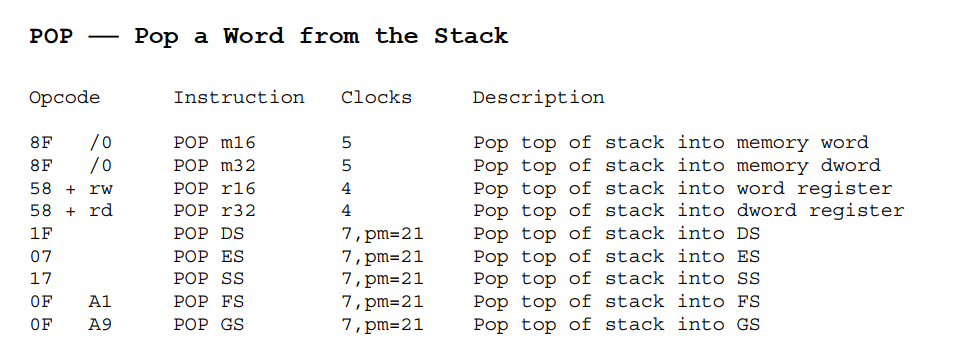
pop指令
操作流程:
① 向译码出的对象操作数中写入栈顶数据。
② 栈顶指针加4,回到push前的状态。
- ret指令
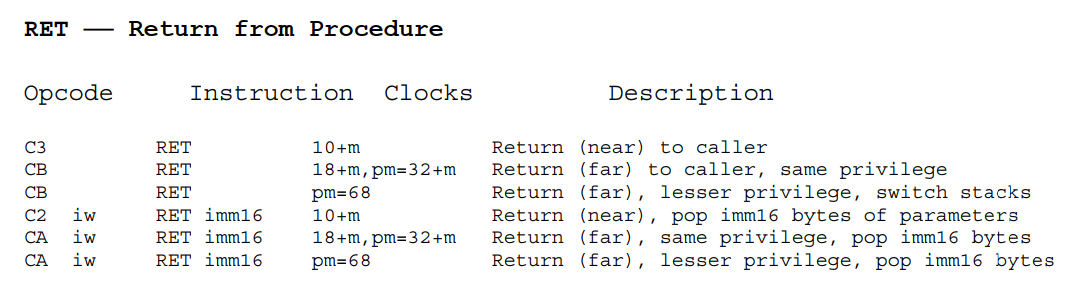
ret指令
操作流程:
① 使eip跳转到esp中存放的地址处。
② 栈顶指针加4。
实现更多指令
- jbe指令
在jcc-template.h指令中添加be字段,并在eflags.h中补充check_cc_be函数。
- leave指令
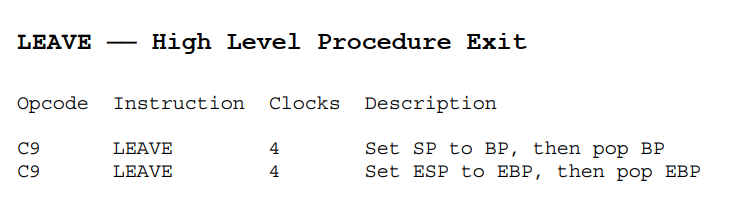
leave指令
操作流程:
① 使esp指向ebp(栈底)所指的位置。
② ebp指向esp所存的地址。
③ 栈顶指针加4。
- add指令
实现浮点数定点化
什么是定点化
我们约定最高位为符号位,接下来的15位表示整数部分,低16位表示小数部分,即约定小数点在第15和第16位之间(从第0位开始)。从这个约定可以看到,FLOAT类型其实是实数的一种定点表示。
更通俗的解释是:定点化数的小数点位置是固定的;或者说,定点化数的小数位数是确定的。
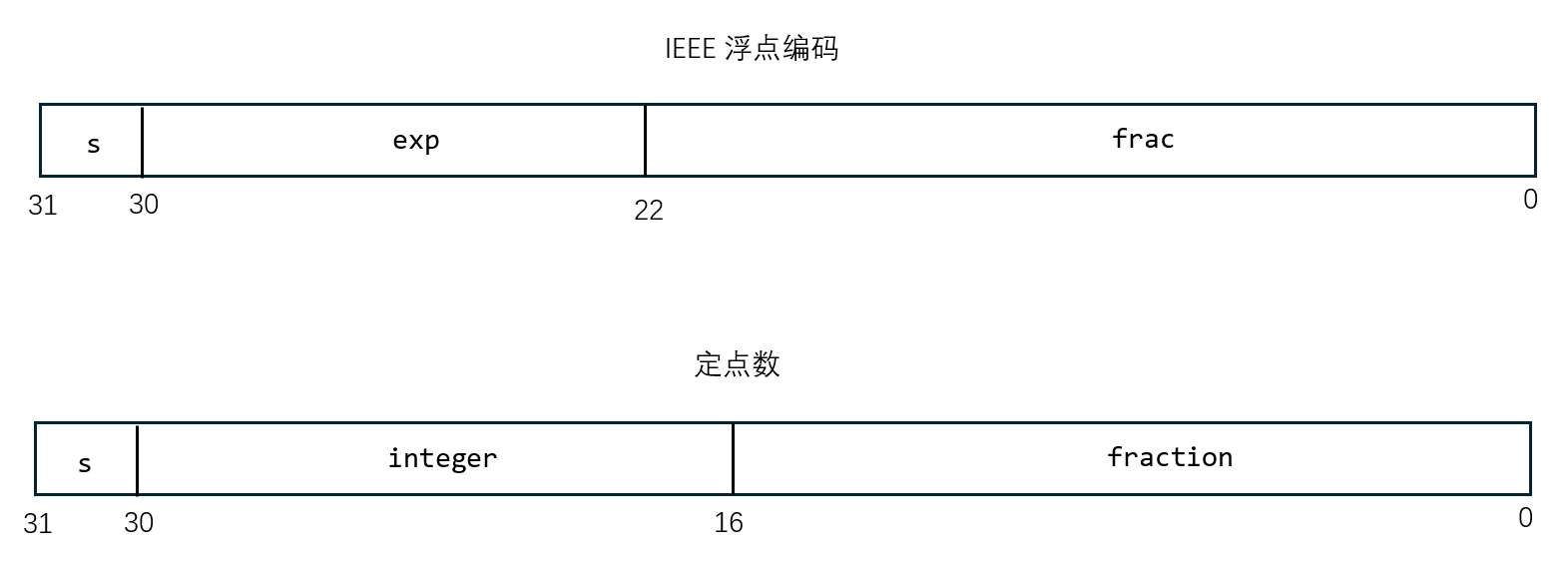
定点数
由这个定义,可以得出以下结论:
对于一个实数a,它的FLOAT类型表示A = a * 2^16 = a << 16。
定点数的运算
在lib-common/FLOAT.h中定义定点数与整型的基本运算:
 1static inline int F2int(FLOAT a) {
 2	// 将定点数转换为整型
 3	return (a >> 16);
 4}
 5
 6static inline FLOAT int2F(int a) {
 7	// 将整型转换为定点数
 8	return (a << 16);
 9}
10
11static inline FLOAT F_mul_int(FLOAT a, int b) {
12	// 定点数与整型相乘
13	return a * b;
14}
15
16static inline FLOAT F_div_int(FLOAT a, int b) {
17	// 定点数与整型相除
18	return a / b;
19}
在lib-common/FLOAT/FLOAT.c中定义浮点数到定点数的转化和定点数的运算:
- 定义浮点数结构
1// 接收IEEE编码的浮点数
2typedef union {
3	struct {
4		uint32_t m : 23;	// 尾数位
5		uint32_t e : 8;		// 指数位
6		uint32_t s : 1;		// 符号位
7	};
8	uint32_t val;
9} Float;
- 将浮点数转化为定点数
回忆浮点数的计算公式:对于一段32位长的浮点数编码,它对应的浮点数值为:$V = (-1)^s \times M \times 2^E$
其中 $E = 1 - bias$,$M = 1 + f$
 1FLOAT f2F(float a) {
 2	/* You should figure out how to convert `a' into FLOAT without
 3	 * introducing x87 floating point instructions. Else you can
 4	 * not run this code in NEMU before implementing x87 floating
 5	 * point instructions, which is contrary to our expectation.
 6	 *
 7	 * Hint: The bit representation of `a' is already on the
 8	 * stack. How do you retrieve it to another variable without
 9	 * performing arithmetic operations on it directly?
10	 */
11
12	Float f;
13	void *temp = &a;
14	f.val = *(uint32_t *) temp;     // 联合体val接收IEEE编码
15
16	uint32_t m = f.m | (1 << 23);	// 为尾数位添加1
17	// 计算偏移量
18	int shift = (int)f.e - (127+23-16);
19
20	// 对m执行偏移操作
21	if(shift > 0) {
22		m <<= shift;
23	}
24	else {
25		m >>= (-shift);
26	}
27
28	return (__sign(f.val) ? -m : m);
29}
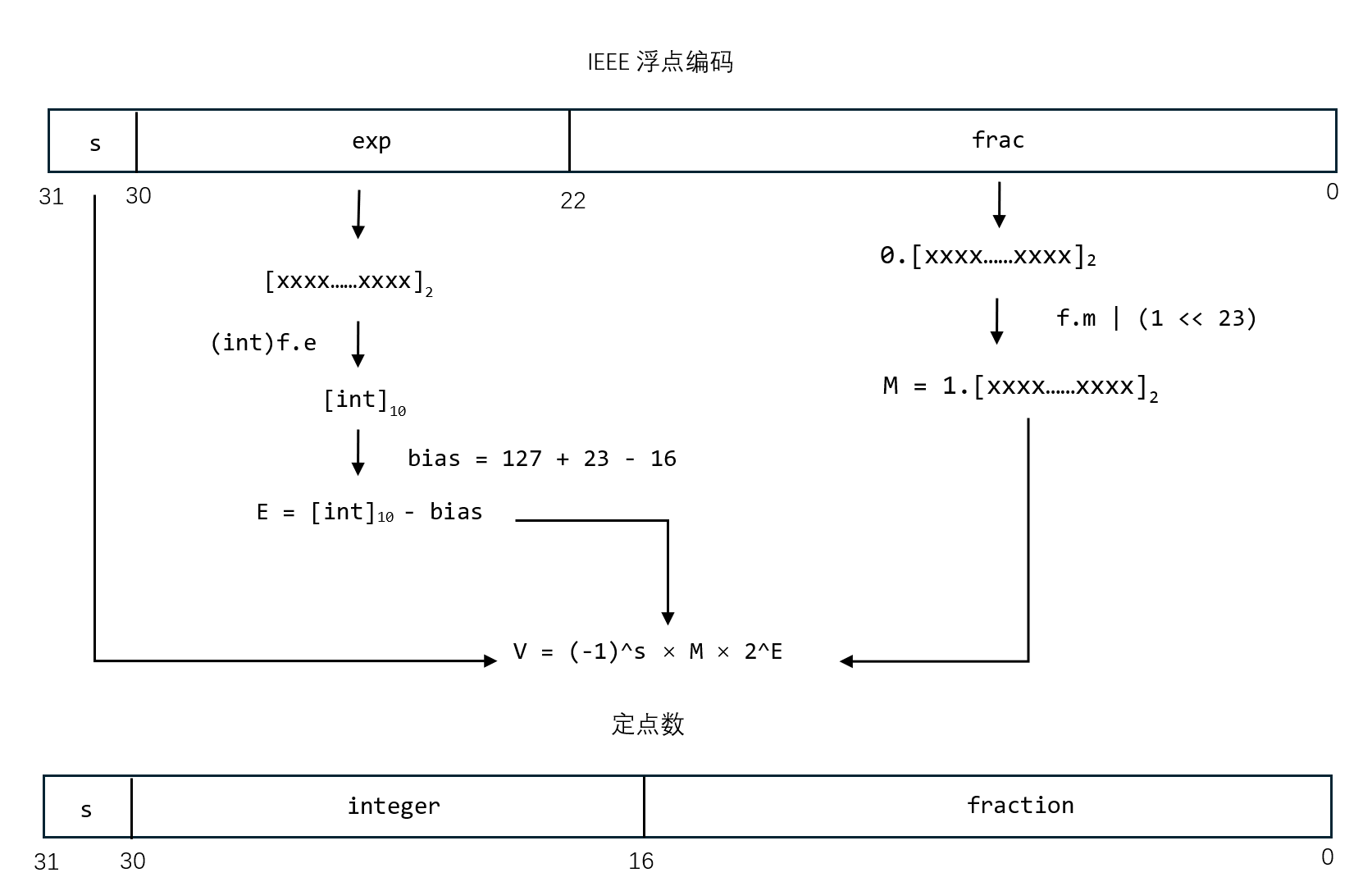
浮点数转定点数
-
实现定点数的运算
-
运行
integral和quadratic-eq,补充缺失指令
为简易调试器增加变量支持
在nemu/src/monitor/debug/elf.c文件中:
 1//sym是我们需要匹配的符号名称,success指针用于设置是否匹配成功
 2uint32_t look_up_symtab(char *sym){
 3    int i;
 4    //遍历符号表逐个匹配符号
 5    for(i=0;i < nr_symtab_entry;i++){
 6        //逐个提取符号信息中的符号类别
 7        uint8_t type = ELF32_ST_TYPE(symtab[i].st_info);
 8        //当遇到类别为FUNC或者OBJECT时候匹配符号名
 9        if((type == STT_FUNC || type == STT_OBJECT) && strcmp(strtab + symtab[i].st_name, sym) == 0){
10        //匹配成功后返回符号的地址
11        return symtab[i].st_value;
12        }
13    }
14    printf("No sym found");
15    return 0;
16}
实现kernel加载
kernel/src/elf/elf.c
 1...
 2	/* TODO: fix the magic number with the correct one */
 3    //修改为elf文件的魔数
 4	const uint32_t elf_magic = 0x464c457f;
 5	uint32_t *p_magic = (void *)buf;
 6	nemu_assert(*p_magic == elf_magic);
 7
 8	/* Load each program segment */
 9    //初始化ph指向program header开头,buf指向elf文件的开头,e_phoff为program header偏移量
10    ph = (void *)buf + elf->e_phoff;
11    //eph指向program header的末尾,e_phnum为program header中segment的数量
12    //遍历program header表,加载需要加载的segment
13	for(Elf32_Phdr *eph = ph + elf->e_phnum;ph < eph;ph++) {
14		/* Scan the program header table, load each segment into memory */
15		if(ph->p_type == PT_LOAD) {
16            uint32_t addr = ph->p_vaddr; //存储segment加载到的目标地址
17			/* TODO: read the content of the segment from the ELF file
18			 * to the memory region [VirtAddr, VirtAddr + FileSiz)
19			 */
20            //利用函数从当前segment中读取filesiz大小的数据到目标地址
21         ramdisk_read((void *)addr, ELF_OFFSET_IN_DISK + ph->p_offset,ph->p_filesz);
22
23			/* TODO: zero the memory region
24			 * [VirtAddr + FileSiz, VirtAddr + MemSiz)
25			 */
26         //通过函数将未初始化的数据置0
27         memset((void *)addr + ph->p_filesz,0,ph->p_memsz - ph->p_filesz);
28...